
Nativefier Alternative Tools for Turning Websites into Apps
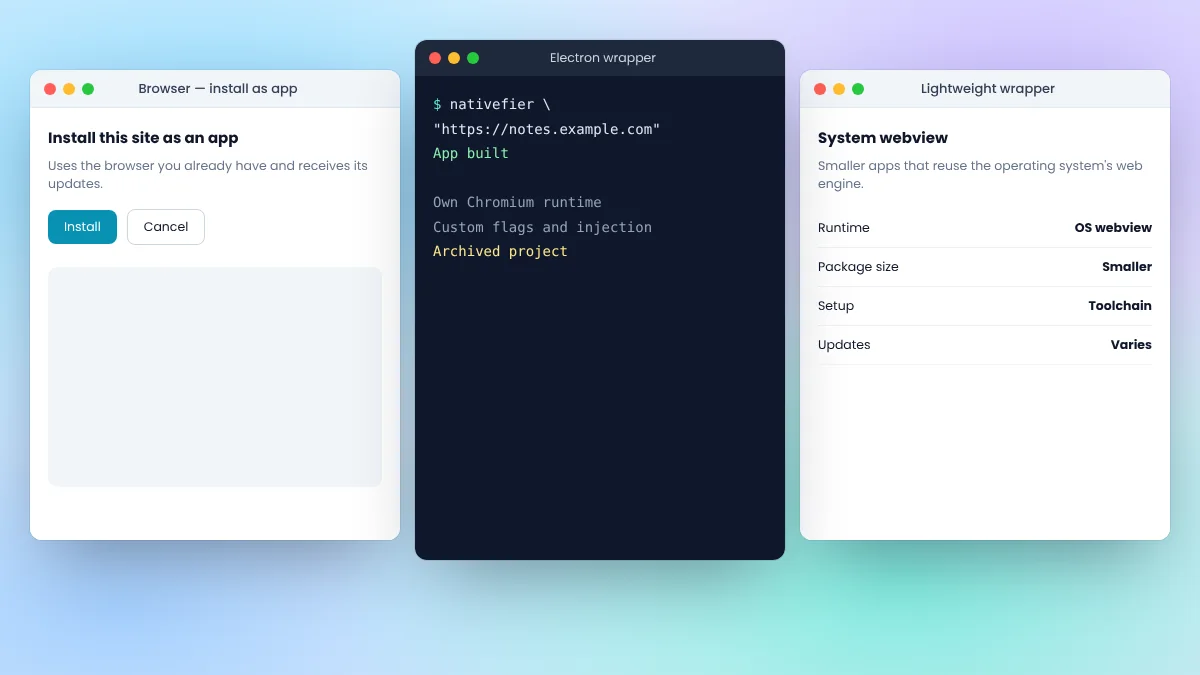
Nativefier alternative tools have become a common search since the original project was archived in September 2023. The good news is that turning a website into a desktop window is easier than ever, because modern browsers include the feature, and newer wrappers produce smaller apps with more active development.
Each option trades convenience, size and control differently. The comparison below helps you pick the one that fits how you use your favourite web apps.
Why Look for a Nativefier Alternative
Nativefier still works, but its default Electron runtime no longer advances, and nobody from the original team is fixing bugs. Every app also bundles a full Chromium engine, which adds noticeable disk usage when you wrap several sites. Those points push many users toward options that update automatically.
The maintainers themselves pointed users toward the app features built into browsers when they announced the end of maintenance. That makes browser-based apps the natural first stop.
Install as App in Chrome and Edge
Chromium-based browsers can install a site as an app with its own window, taskbar icon and Start menu or Applications entry. In Chrome the option sits under the "Cast, save and share" menu, while Edge lists it under Apps. Sites built as progressive web apps get the best experience, but most sites can be installed this way.
- Updates arrive automatically with the browser.
- No command line or Node.js required.
- Apps share the browser profile, so existing logins carry over.
- Fewer options for injecting custom CSS or JavaScript.
Safari Web Apps and Firefox Options
On recent versions of macOS, Safari can add a website to the Dock as a standalone web app with its own window and separate cookies. Firefox does not offer the feature by default, but the community PWAsForFirefox project adds it through an extension and a small native companion program.
Lightweight Wrappers Such as Pake
Pake is an open-source tool built on Rust and Tauri that wraps a website in the operating system's own web view rather than a bundled Chromium. Apps come out far smaller than Electron builds, and the command-line style will feel familiar to Nativefier users.
The trade-off is that rendering depends on the system web engine, so a site may look or behave slightly differently between Windows, macOS and Linux. Building may also need extra toolchains on some systems.
Building Directly with Electron or Tauri
Developers who need full control can skip wrappers entirely. A small Electron or Tauri project that loads a URL takes little code, and you choose exactly when to update the runtime. This route suits teams shipping an internal tool to many machines.
Comparison at a Glance
| Option | Engine | Updates | Customisation | Setup effort |
|---|---|---|---|---|
| Nativefier | Bundled Electron | Manual rebuilds | Very high | Node.js and CLI |
| Chrome or Edge apps | Browser engine | Automatic | Low | A few clicks |
| Safari web apps | WebKit | With macOS | Low | A few clicks |
| PWAsForFirefox | Firefox | With Firefox | Moderate | Extension plus helper |
| Pake | System webview | Rebuild per release | High | CLI and toolchain |
| Custom Electron or Tauri | Your choice | You control it | Complete | Programming required |
When Nativefier Still Makes Sense
Nativefier remains handy for quick experiments, internal dashboards and situations where you want injected CSS or JavaScript without writing a full project. Its long list of flags, from tray icons to user agent presets, is still more extensive than most browser features.
If you keep using it, build against a newer Electron version where possible and limit apps to trusted websites, as described in the safety guide.
How to Choose the Right Option
Start with the website itself. A service that already works well as an installed browser app rarely needs anything more, while a site you want to restyle or lock to certain domains benefits from a wrapper with more options.
Then consider who maintains the result. Browser apps update with no effort, whereas wrapper builds need occasional rebuilding, which matters if you plan to share them across a team.
- Need zero maintenance: browser install-as-app features.
- Need small app files: system webview wrappers.
- Need deep customisation quickly: Nativefier with inject options.
- Need long-term control: a custom Electron or Tauri project.
Moving Daily Workflows Over
Switching tools works best one app at a time. Install the replacement for a single site, use it for a few days, and only then remove the old Nativefier build. That way you notice missing behaviours, such as tray icons or injected styles, before they disrupt your routine.
Keep a short note of the Nativefier flags each app used. It becomes a checklist when recreating similar settings elsewhere.
Cost and Licensing
Nativefier, Pake and PWAsForFirefox are open-source projects, and browser app features come free with the browser. Some app managers that bundle catalogues of web apps follow a commercial model with free and paid tiers, so check the current terms before adopting one for a team.
Keeping Logins Safe During the Switch
Recreating an app in another tool usually means signing in again, since cookies stay inside the old app profile. Sign out of the old Nativefier app first if it holds an active session, then delete its folder once the replacement works as expected.
Frequently Asked Questions
The install-as-app feature in Chrome or Edge is the simplest, since it needs no extra software and updates with the browser.
Wrappers that use the system webview, such as Pake, produce much smaller files than tools that bundle Chromium.
There is no direct converter. Recreate the app in the new tool using the same website address and settings.
Not directly. You would need a browser extension that applies styles, which is less integrated than the Nativefier inject option.
Conclusion
Nativefier alternative choices range from zero-setup browser apps to lightweight wrappers and full frameworks. Browser features win on automatic updates, Pake wins on size, and custom Electron or Tauri projects win on control, while Nativefier itself still shines for heavily customised quick builds.
Pick based on how sensitive the website is and how much customisation you need, and read the update guide if you plan to keep existing Nativefier apps running.